I am gonna show zero standing privileges by default.
In this case, I'm gonna show a connection to a production database in a just-in-time fashion, and I'm gonna demonstrate that there are no credentials ever exposed to the end user.
Thereby eliminating attack pads tied to Soland credentials and enables verifiable zero-standing privileges.
Let's go look for the database that we want to connect to. In this case, it's a production database.
Go through the catalog and the Slack application.
I'm gonna search by tags.
Let's go look for my database.
It is the Production Postgres database.
I found my database.
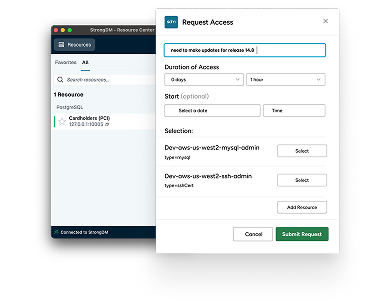
I'm gonna enter a reason, choose a time duration, hit submit.
A human needs to approve it.
I'm gonna find that in the Slack app as well.
Let's hit approve. Once an admin approves, the database will show up on the strong DM desktop UI.
Let's hit connect. I'm gonna establish the session by connecting with a database client.
In this case, it is the Beekeeper Studio client.
If I look, there's no username or password, thereby showing that credentials are never exposed to me.
Let's hit connect. I'm in a database.
I'm gonna change a name that's a typo in this database that has PIA Information apply.
The change has been committed.
We can review all of the queries in the log file. I see all of the database queries, including that update query that I just submitted.
Let's go ahead and establish a loop to ensure and see that a session is terminated will result in a disconnection.
I'll do this one from the command line using the same local host port name and no credentials.
I'll now terminate the session manually.
And we'll see the disconnect for that.
We'll go to requests, see the request, and I'll hit revoke access, which will terminate the session early.
I hit revoke access.
The session has been terminated and the connection to the database has been lost.